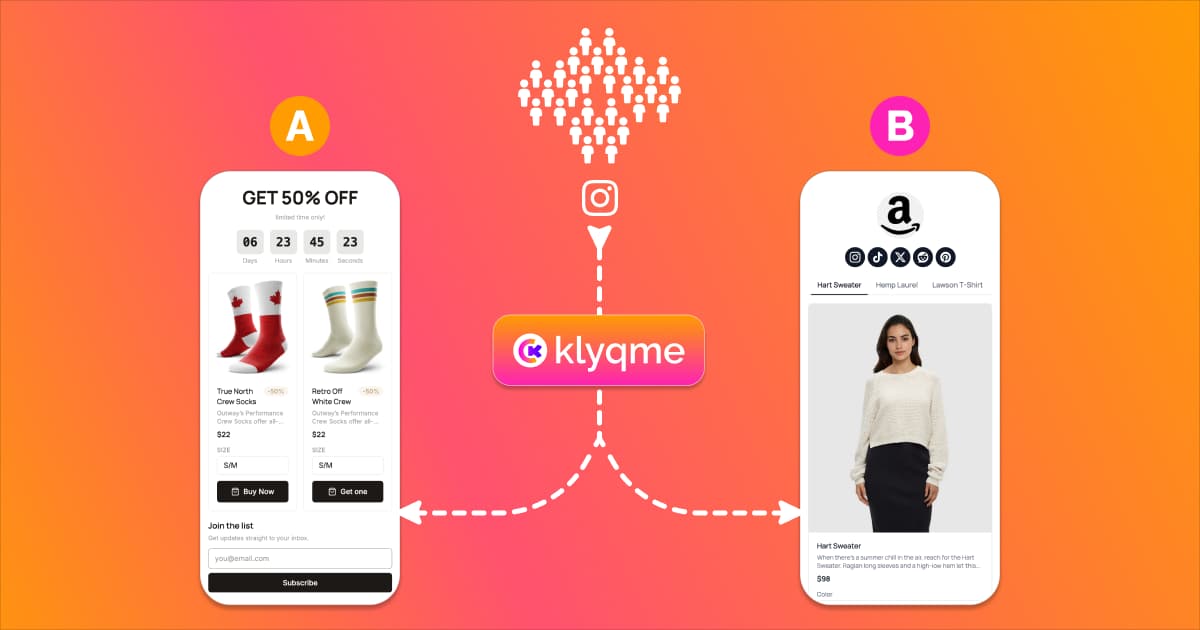
Most creators and marketers never a/b test their link in bio. They spend hours designing the page, pick a layout that "feels right," and never touch it again. The page gets traffic. Some people click. Most don't. And there's no way to know if a different version would have performed better.
The average link-in-bio page converts between 2% and 3% of visitors into clicks. That number sounds discouraging, but it means there's enormous room to improve. A better headline, a different button color, a reordered list of links: small changes like these routinely double click-through rates when tested properly. The problem is that most bio page tools don't offer testing. You're stuck guessing.
Klyqme's built-in experiment engine handles the hard part: splitting visitors between versions of your bio page and tracking which one gets more clicks or conversions. You pick what to test, the system manages the traffic routing and the statistics. The feature is available on the Growth plan.
Why A/B Test Your Bio Page
You chose a background color, wrote a headline, arranged your links in a specific order. But was any of that the best option? You don't know, because you only launched one version. Every design decision on your bio page is a hypothesis, and without testing, it stays a hypothesis forever.
The cost of not testing is invisible but real. If your bio page gets 1,000 visitors a month and converts at 3%, that's 30 clicks. If a simple change to your CTA button text could push that to 5%, you're leaving 20 clicks on the table every month. Over a year, that's 240 missed opportunities to drive traffic to your store, your content, or your offer. When you multiply that by the value of each click, the numbers add up fast.
Analytics alone won't solve this. Your dashboard can tell you that 3% of visitors clicked your top link last week. It cannot tell you what would have happened if you'd moved that link to the second position, changed the button from "Shop Now" to "See New Arrivals," or swapped your profile photo for a product image. To answer those questions, you need to test different bio page versions against each other and let your actual visitors decide which one works.
A/B testing removes the guesswork from link in bio optimization. Instead of redesigning your entire page based on a gut feeling, you change one element, split your traffic, and let the data tell you which version performs better. Over time, each winning change compounds. A page that started at 3% can reach 6%, 8%, even 10% through a few rounds of disciplined testing.
What You Can A/B Test on a Bio Page
Before you run your first experiment, decide what to change. Not every element on a bio page carries equal weight. The ones below have the most direct impact on whether visitors click or bounce.
Headlines and intro text. The text at the top of your bio page is the first thing visitors read. Test different angles: a benefit-driven headline ("Get 20% off your first order") vs. an identity statement ("Handmade jewelry for everyday wear") vs. a simple greeting. Even small wording changes can shift how people perceive the rest of your page.
CTA buttons: text, color, and placement. Link in bio CTA testing is one of the fastest ways to see results. "Shop Now" vs. "Browse Collection" vs. "See What's New" can produce very different click rates. The same goes for button color. A high-contrast button that stands out from your page background almost always outperforms one that blends in. Placement matters too: try your most important CTA as the first link vs. the second or third.
Link order. The link at the top of your page gets the most clicks by default. But is it the right link to put first? Test reordering your links to see if a different sequence drives more total engagement. Sometimes burying your main offer below a piece of free content increases trust and leads to more conversions overall.
Design and colors. Dark mode vs. light mode. Minimalist layout vs. image-heavy cards. Rounded buttons vs. sharp corners. These visual choices set the tone and affect how professional or inviting your page feels. Test one design variable at a time so you know exactly what caused the change in performance.
Number of links. More links give visitors more options, but they also create more decision fatigue. Test a version with 4 links against one with 8 to find the sweet spot for your audience. For some creators, fewer options lead to higher click rates because visitors aren't overwhelmed.
Images and thumbnails. If your bio page supports link thumbnails or a hero image, test different visuals. A product photo vs. a lifestyle shot. Your face vs. your brand logo. Images can draw attention, build trust, or distract, depending on what you use and where you place them.
Social proof blocks. Testimonials, review counts, follower milestones, press mentions. Adding social proof can boost credibility and encourage clicks. But it also pushes your links further down the page. Test whether adding a social proof block above your links helps or hurts overall click-through.
Product selection. If you sell products through your bio page, test which products you feature. Your best seller might not be your best converter from social traffic. Try featuring a lower-priced entry product or a seasonal item and see if it changes the number of people who click through to your store.
How to Set Up Your First A/B Test
If you already have a published bio page on Klyqme, skip straight to Step 2. Otherwise, start from the beginning.
Step 1: Create Your Base Bio Page
If you don't have a bio page yet, sign up for Klyqme and create one from the dashboard. Add your blocks: links, buttons, images, text, products, or whatever combination fits your brand. Style the page with your colors and fonts. Then publish it. This published version becomes your "Main" variation, the control in your experiment.
If you already have a live bio page, you're ready for the next step.
Step 2: Create a Variation
From your bio page detail view, find the Variations tab. This shows a table listing all versions of your page. Right now, you should see one row labeled "Main."
Open the actions dropdown on the Main row and click Create A/B Version. The system clones your entire page (layout, blocks, content, styles) and adds it to the table as "Variation 1." Your original stays as "Main."
Now edit the variation. Open Variation 1 in the bio page builder and change the element you want to test. The golden rule of A/B testing: change one thing at a time. If you change the headline and the button color and the link order all at once, you won't know which change caused any difference in results.
Once you're happy with the variation, publish it. Both the Main page and Variation 1 must be published before you can start an experiment.
Step 3: Start an Experiment
With two or more published variations, a Start A/B Test button appears above the variations table. Click it to open the experiment creation dialog.
Fill in three things:
- Name. Give the experiment a descriptive label so you remember what you're testing. Something like "CTA color test" or "Product order test" works well.
- Mode. Choose between two options. Fixed Split lets you set exact traffic percentages for each variation (like 50/50 or 70/30) and keeps them constant throughout the test. Smart Optimization starts with an equal split and then automatically shifts more traffic toward the better-performing variation as data comes in. Fixed Split is best for pure measurement. Smart Optimization is best when you want to maximize conversions during the test, not just after it.
- Goal. Select what you're optimizing for: Clicks (link and block clicks) or Conversions (purchases, form submissions, or other conversion events).
If you chose Fixed Split, you'll see sliders for each variation. Adjust them to set your traffic allocation. The sliders auto-balance so they always add up to 100%.
Click Create & Start. The experiment is now live and splitting traffic between your variations.
Step 4: Monitor Performance
The experiment dashboard appears inline above the variations table. It shows your experiment name, a status badge (Running), the mode (Fixed Split or Auto-optimizing), and the goal (Clicks or Conversions).
Below that, you'll see one card per variation. Each card displays four metrics:
- Views: how many unique visitors saw that variation
- Clicks: how many link or block clicks occurred
- Click Rate: clicks divided by views, shown as a percentage
- Weight: the current share of traffic going to that variation
The variation with the best click rate gets a green border and a "Leading" badge. In Smart Optimization mode, you'll see the traffic weights shift over time as the system learns which variation performs better. The dashboard refreshes every 10 seconds automatically.
Step 5: End the Experiment and Apply the Winner
You can pause and resume the experiment at any time if you need to make adjustments or simply want to stop traffic splitting temporarily.
When you're ready to end the test, click End Experiment. A confirmation dialog appears. Click End & Declare Winner to finalize. The system records the best-performing variation as the winner, marked with a trophy icon in the dashboard.
In Smart Optimization mode, you may not even need to end the test manually. The system can auto-declare a winner when one variation reaches 95% or higher probability of being the best performer, provided each variation has received at least 100 views. This prevents experiments from dragging on longer than necessary.
After the experiment ends, apply what you learned. Keep the winning variation as your main page. Use the insights to plan your next test. Iteration is where the real gains happen: each round of testing builds on the last.
Try A/B testing free with Klyqme
How to Read Your A/B Test Results
Running an experiment is the easy part. Knowing what the results mean is where most people get tripped up.
Key metrics. Views tell you how many unique visitors saw each variation. Clicks count how many of those visitors clicked a link or block. Click Rate (clicks divided by views) is the most important number because it normalizes for traffic differences between variations. Traffic Weight shows the percentage of incoming traffic currently directed to each variation.
When to end the test. Resist the urge to call a winner after 20 views. Small sample sizes produce unreliable results. As a minimum, wait until each variation has at least 100 views. If you're using Smart Optimization mode, the system handles this for you: it only declares a winner when it has enough data to be statistically confident (95% or higher probability). For Fixed Split experiments, the 100-views-per-variation rule is a solid starting point. Depending on how different the click rates are, you may need more data. If two variations are at 4.1% and 4.3%, you'll need a much larger sample than if they're at 3% and 7%.
"Leading" vs. "Winner." During a running experiment, the variation with the best click rate is labeled "Leading." This is a live indicator; it can change as more data comes in. After the experiment ends, the winning variation gets a trophy icon and is recorded permanently. "Leading" is a snapshot. "Winner" is the final verdict.
SRM warnings. SRM stands for Sample Ratio Mismatch. If the experiment dashboard shows an SRM warning, it means the actual traffic split doesn't match what the experiment was configured to deliver. For example, if you set a 50/50 split but one variation received 60% of the traffic, something external may be distorting your results. Common causes include bot traffic, browser caching, or a broken variation page. If you see an SRM warning, investigate before trusting your results.
A/B Testing Tips for Instagram and TikTok
Your bio page traffic comes from specific platforms, and each platform's audience behaves differently. The tactics that convert Instagram shoppers won't necessarily work on TikTok browsers.
Instagram. Your Instagram bio allows a single link, which makes your bio page the storefront for everything you do. Test product order carefully: the first product or link a visitor sees gets disproportionate attention. UTM tracking matters on Instagram because roughly 40% or more of Instagram traffic shows up as "Direct" in analytics tools (Instagram strips referrer headers). Add UTM parameters to your bio link so you can attribute traffic accurately. Also test your intro text: Instagram visitors often arrive expecting to see something specific from your latest post or story, so aligning your bio page headline with your recent content can lift click rates.
TikTok. TikTok traffic tends to be more impulsive. Visitors arrive with shorter attention spans and are less likely to scroll through a long list of links. Test bold, attention-grabbing CTAs that match the energy of TikTok content. Fewer links often perform better for TikTok audiences because the reduced choice set leads to faster decisions. Test a stripped-down version of your bio page with just 3 or 4 links against your full version.
Cross-platform testing. If you drive traffic from both Instagram and TikTok, consider sharing different bio page links on each platform. You can use Klyqme's manual variation links (the ?v= parameter) to send Instagram followers to Variation 1 and TikTok followers to Variation 2. This lets you compare audience behavior across platforms without running a formal experiment. When you're ready to optimize within a single platform, switch to an automated experiment.
Common Mistakes to Avoid
A/B testing is straightforward in concept but easy to mess up in practice. These are the most common mistakes that lead to wasted time or wrong conclusions.
Testing too many changes at once. If you change the headline, the button color, the link order, and the background image all in one variation, you'll have no idea which change made the difference. Test one variable per experiment. It takes longer, but the results are reliable and actionable.
Ending tests too early. You see one variation leading after 30 views and declare victory. The problem: with that little data, the "winner" might just be random noise. Wait for at least 100 views per variation before drawing conclusions. If you're using Smart Optimization, the system won't declare a winner until it's statistically confident, so trust the process.
Ignoring the losing variation. A losing variation still contains valuable information. If your "bold red CTA" lost to your "subtle blue CTA," that tells you something about your audience's preferences. Document what you tested and what lost, not just what won. Over time, this builds a knowledge base about what your specific audience responds to.
Never testing again. One successful A/B test is not the finish line. Your audience evolves. Platforms change. Seasonal trends shift what people respond to. The most effective bio pages are the ones that get tested continuously, not once. Aim to run at least one experiment per month.
Testing when traffic is too low. If your bio page gets 50 visitors a month, an A/B test will take months to produce meaningful results. Before investing in split testing, make sure you have enough traffic to support it. A rough minimum: you should be able to reach 100 views per variation within two weeks. If your traffic is lower than that, focus on growing your audience first and test later.
Frequently asked questions
You need the **Growth plan** to access the experiment engine. Core plan users can create up to 2 variations per bio page for manual comparison (sharing different `?v=` links with different audiences), but automated traffic splitting and the experiment dashboard require Growth. [See plans](/#pricing).
Up to 5 variations per bio page on the Growth plan. That said, testing 2 variations (the classic A/B test) is the most common and usually produces the clearest results. The more variations you add, the more traffic you need to reach statistical significance for each one.
Until each variation has at least 100 views. For most creators with moderate traffic, that means a few days to a couple of weeks. If you're using Smart Optimization mode, the system auto-declares a winner at 95% confidence once the sample size is large enough. You don't need to guess when to stop.
When an experiment is running, it takes full control of traffic routing. If you previously shared links with the `?v=` parameter to direct people to specific variations, those parameters are temporarily overridden by the experiment. Visitors are assigned to variations automatically based on the experiment's traffic allocation. When the experiment ends, manual `?v=` links resume their normal behavior. You don't need to update or change any URLs.
No. Linktree, Beacons, Stan Store, and LinkShop do not offer native A/B testing for bio pages. Some suggest manually swapping your page and comparing analytics across time periods, but that's not a real split test because external factors (time of day, content posted, algorithm changes) contaminate the comparison. Klyqme is the only major link-in-bio tool with a built-in bio page a/b testing tool that splits live traffic between variations simultaneously and tracks results automatically.
**Fixed Split** keeps your traffic percentages exactly where you set them for the entire experiment. If you choose 50/50, each variation gets half the traffic from start to finish. This is pure measurement: both variations get equal exposure, and you compare their performance afterward. **Smart Optimization** starts with an equal split but then automatically shifts more traffic toward the variation that's performing better. This means you lose less traffic to the underperforming variation during the test. The trade-off is that the uneven traffic distribution makes it harder to do a simple side-by-side comparison, but the system accounts for this statistically. Use Fixed Split when you want clean, balanced data. Use Smart Optimization when you want to maximize results during the test, not just after it.
No. Returning visitors always see the same variation they were originally assigned to. Assignment is sticky: once a visitor is placed in a group, they stay there for the duration of the experiment. There's no flickering or inconsistency between visits. This is handled automatically through a visitor cookie that persists for 14 days.
References
[2] Replug, "How to A/B test your bio link page?", 2025. Competitor guide covering URL-level redirect splitting.
[3] BioSites, "How to A/B test to optimize your link in bio", 2025. Covers manual time-based page swapping.
[4] Liinks, "A/B Test Your Link in Bio (Without Losing Your Mind)", 2025. Covers spreadsheet-based manual tracking.
[5] Average link-in-bio page click-through rates of 2-3% are based on aggregated data from Replug, BioSites, and Liinks reporting in their respective guides. Actual rates vary by niche, audience size, and traffic source.