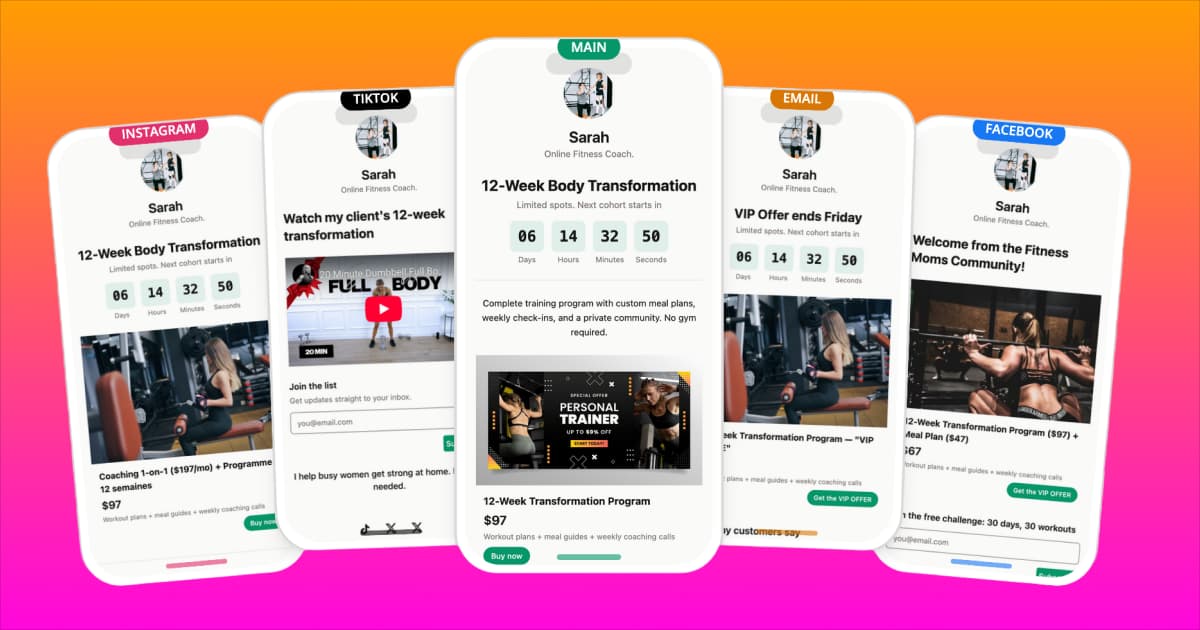
Your Instagram bio gets one link. The people who tap it already follow you, already watch your content, and already trust your advice. That is the highest-intent traffic you will ever get. Most fitness coaches send it to a page with six links, no clear hierarchy, and no way to buy anything without four more taps.
This guide covers how to fix that: what to put on your bio page, how to sell programs directly without a website, how to capture email addresses from day one, and how to run retargeting ads against the 97% of visitors who don't buy the first time they land.
Build your fitness coaching bio page. Start free.
Why Fitness Coaches Need More Than a List of Links
The fitness creator economy is real and the numbers are significant. Coaches who have built audiences of 10,000 to 100,000 followers are regularly generating $5,000 to $50,000 per month from digital products alone, without a studio, without employees, and without a website that ranks in Google search [1]. The income comes from workout plans, video courses, membership communities, and 1-on-1 coaching sold directly to followers.
The bio link is the mechanism that makes all of that possible. When someone watches your reel, reads your caption, or sees your TikTok and decides they want more, the bio link is the next tap. It is the only clickable link Instagram gives you. Everything you sell, every email you capture, every consultation you book goes through it.
A plain link directory treats that tap like navigation: here are some places you could go. A properly built bio page treats it like a storefront: here is what I offer, here is what it costs, and here is how to get it right now.
The distinction matters because mobile conversion is fragile. Every additional tap after the first costs you a percentage of your audience. Visitors who land on a focused, shoppable bio page with a clear featured product convert at dramatically higher rates than visitors who land on a list of generic links and have to figure out where to go next.
Your bio link is not a navigation hub. It is the front door of your business.
What to Put on Your Fitness Coach Bio Link Page
The goal of your bio page is to serve three types of visitors simultaneously: the person who is ready to buy right now, the person who needs a small first step before they commit, and the person who is still deciding whether to trust you. Your page structure needs to handle all three.
Profile block with credentials and social proof. Start with your name, a one-line description of who you help and how, and the facts that establish authority fast: certifications (NASM, ACE, CSCS), years of experience, total clients trained, or follower count. Three to five client transformation results, either as a number ("helped 400 clients lose their first 20 lbs") or a short quote, work better than any bio copy you can write about yourself.
Featured program or product. This goes first, immediately below your profile. Put your best-selling or highest-value offer front and center, not buried third or fourth down the page. Mobile visitors scroll less than you think. If your $149 12-week program is what pays your rent, it should be the first thing people see after they read who you are.
Email capture with a lead magnet. The person who is not ready to buy yet will leave your page and probably not come back unless you have a reason to keep the relationship going. An email capture block with a compelling free offer is that reason. A free 7-day workout plan, a PDF meal plan, or a 5-day fitness challenge signup all work well for fitness audiences. The lead magnet should be something they can actually use in the next week, not a generic ebook they will never open.
Booking link for 1-on-1 coaching. If you take private clients, a consultation booking block needs to be visible and tappable. Calendly, Acuity, and similar tools integrate cleanly. Some of your most valuable clients will come from followers who were looking for digital products but decided they wanted personalized coaching after they saw a booking option.
Social proof and testimonials. Before-and-after results, client quotes, and transformation stories placed mid-page give the visitor who is still on the fence a reason to keep scrolling. These work best as image blocks with a short caption rather than long written testimonials.
Product blocks for digital products. Each workout plan, video course, or ebook gets its own product block: image, title, price, and a buy button. Keep descriptions short. The visitor came from your content; they already have context. You are not writing a sales page, you are giving them a place to complete a decision they are already making.
Physical product blocks for Shopify sellers. If you sell supplements, resistance bands, apparel, or gym gear through a Shopify store, product blocks connect directly to your catalog. Inventory stays in sync automatically, so you are never showing a buy button for something that is out of stock. See the ecommerce bio link guide for a deeper look at how product blocks work for physical goods.
Social icons. Put these at the bottom. They are navigation away from your page, so they should not compete with your products and your email capture.
How to Sell Fitness Programs Directly from Your Bio
The fastest path from follower to paying customer is two taps: one to your bio page, one to buy. No website, no redirect through three different pages, no checkout process that kicks them out of the flow they were already in.
Digital products via Stripe. Workout PDFs, video course access, ebook downloads, and membership signups all sell through Stripe Connect checkout embedded directly in your bio page. A visitor taps buy, enters their card, and gets their download link or access confirmation within seconds. You do not need a Shopify store, a separate landing page, or a third-party course platform to make this work.
Physical products via Shopify. If you run a Shopify store for supplements, gear, or branded apparel, connect it in the integrations panel and pull products directly into your bio page as shoppable blocks. Customers complete the Shopify checkout without leaving the bio page experience. The Shopify connection also handles the ecommerce side: inventory, shipping, fulfillment, everything you already have set up.
Price points that work. The fitness digital product market has clear tiers that consistently sell [1]:
- PDF workout plans and meal guides: $10 to $50
- 4-to-12 week training programs: $49 to $199
- Video courses and coaching programs: $97 to $499
- Monthly membership communities: $20 to $100 per month
The bio page works best for the lower to mid-tier products where the purchase decision is fast. High-ticket offers ($500 and up) typically need a longer conversion path, but your bio page can capture the lead that eventually becomes that client.
Transaction fees are a real cost. At $5,000 per month in digital product sales, a 9% transaction fee costs $450. That is $5,400 per year going to fees instead of your business. Beacons charges up to 9% on its free plan. Klyqme's Growth plan at $49 per month takes 0%, which pays for itself in the first $545 of monthly sales. See full pricing details.
How to Capture Leads from Instagram Using Your Bio Link
Your Instagram followers are rented. If Instagram changes its algorithm, restricts your account, or disappears entirely, your audience goes with it. Your email list is owned. It moves with you regardless of what any platform decides to do.
The email capture block on your bio page is the mechanism that converts rented followers into owned subscribers. The key is making the offer specific enough to be worth their email address.
Lead magnets that work for fitness audiences. Generic offers underperform. "Subscribe to my newsletter" does not move people. These do:
- Free 7-day workout plan (specific, time-bound, immediately useful)
- 5-day meal prep guide with a shopping list (solves a concrete problem)
- 21-day fitness challenge signup (community-driven, creates commitment)
- Free macros calculator or TDEE guide (tool-based, referenced repeatedly)
- "My exact morning routine" or "The 4 exercises I do every week" (personal, specific)
The offer needs to match where your audience is in their fitness journey. If your content attracts beginners, a "30-day beginner workout plan" will outperform a "advanced periodization guide."
Mailchimp integration. Connect Klyqme to your Mailchimp account and every email submitted on your bio page goes directly into your list, tagged by source. You can build an automated welcome sequence that starts immediately: day one sends the free plan, day three sends a follow-up with tips on getting the most from it, day seven introduces your paid program. That sequence runs automatically for every new subscriber, which means you are selling while you are creating content.
The conversion path works like this: a follower taps your bio link, downloads your free plan, enters their email, receives the automated sequence, and buys your paid program. No ad spend. No outreach. The funnel runs in the background while you post content.
Build your list from the first day you create your bio page. An email list of 2,000 engaged subscribers who downloaded your free plan and received your welcome sequence is worth more than 50,000 Instagram followers who never gave you contact information.
See the fitness coach bio page template
Retargeting: Recovering the 97% Who Don't Buy
Even a well-built bio page with a clear offer and strong social proof is not going to convert most visitors on the first visit. The average ecommerce conversion rate sits around 2-3% [2], and fitness programs are not impulse purchases. People research, they compare, they think about it for a few days. Without retargeting, you have no way to reach them again.
Install your pixels. Four pixels belong on every fitness coach's bio page:
- Meta Pixel for Facebook and Instagram ads
- TikTok Pixel for TikTok ads
- Google Tag for Google Ads and GA4 tracking
- LinkedIn Insight Tag for LinkedIn ads (especially useful if you target corporate wellness or B2B coaching)
Each installs in under a minute in your Klyqme page settings: paste the pixel ID, save, done. Once they are live, every visitor to your bio page is added to your remarketing audiences on each platform, regardless of which platform sent them. For a full walkthrough of how retargeting pixels work on a bio page, see the retargeting pixels guide.
Retargeting ad strategies that work for fitness. The most effective retargeting formats for fitness coaches are:
- Transformation ads. Before-and-after results from real clients. These work because visitors to your bio page already know who you are; they need evidence that your program produces results for people like them.
- Testimonial ads. A short video clip or quote from a client who completed your program. Specific results outperform generic praise ("I lost 18 lbs in 12 weeks" outperforms "this program changed my life").
- Limited-time offer ads. A deadline creates urgency for the people who were interested but did not buy. A 48-hour discount or a bonus add-on for the next 20 buyers recovers a percentage of visitors who left to think about it.
Cross-platform retargeting. Someone who visited your bio page from TikTok can be retargeted with Instagram ads. Someone who found you on Instagram can see your Google Display ads. The pixel data follows the visitor, not the platform. This cross-platform coverage is what makes the 97% of non-buyers recoverable instead of gone.
The math is straightforward. If 1,000 people visit your bio page per month and 30 buy (3% conversion), a retargeting campaign that recovers even 1% of the remaining 970 adds 10 more sales with no additional content required.
Setting Up Your Fitness Bio Link Page on Klyqme: Step by Step
The full setup takes about 15 minutes. Here is the exact order.
Step 1: Create Your Account and Choose the Fitness Coach Template
Go to klyqme.com and sign up. No credit card required on the free plan. During onboarding, select the fitness coach template. It comes pre-structured with a profile block, product blocks, and an email capture block already in place. You are editing the template content rather than building from scratch.
Set your page URL to klyqme.com/yourname or klyqme.com/yourhandle to match your social profiles. Consistency makes it easier for followers to remember and type directly.
Step 2: Connect Shopify and Stripe
If you sell physical products, connect your Shopify store in the integrations panel. Your product catalog syncs automatically. Select the products you want to feature and they populate as shoppable blocks with your existing images, titles, and prices.
For digital products, Stripe Connect handles payments and delivery. Link your Stripe account, upload your product files (PDF, video course link, membership URL), set your price, and the checkout is live.
Step 3: Add Your Featured Program and Product Blocks
Place your highest-value or best-selling offer at the top of the page, directly below your profile block. Add secondary products below that. Keep the product descriptions to one or two sentences. Your content and your reputation do the selling; the bio page just needs to make buying easy.
Step 4: Set Up Email Capture with Your Lead Magnet
Add an email capture block and upload your lead magnet (the PDF, the challenge signup page, or the tool link). Write a headline that names the specific thing they are getting: "Get my free 7-day workout plan" converts better than "Join my email list."
Connect to Mailchimp (or whichever email platform you use) and set up the automated welcome sequence before you launch. The sequence should:
- Deliver the free resource immediately
- Follow up at day 3 with tips on using it
- Introduce your paid program at day 7
Step 5: Install Your Retargeting Pixels
In your page settings, paste your Meta Pixel ID, TikTok Pixel ID, and Google Tag ID. All three take about two minutes total. Once saved, every visitor to your bio page starts populating your ad platform audiences.
Step 6: Configure UTM Tracking
Over 40% of social traffic appears as "Direct" in analytics because in-app browsers strip referrer data [3]. In your Klyqme analytics settings, set your default UTM parameters for each traffic source. Klyqme appends them automatically to every outbound link on your bio page. Your attribution data will show accurate source tracking instead of an unattributable direct traffic lump.
Step 7: Update Your Instagram and TikTok Bios
Go to Instagram, tap edit profile, and replace whatever is currently in your bio link field with your new Klyqme URL. Do the same on TikTok, YouTube, and any other platform where your bio link appears.
This step takes 90 seconds but matters as much as everything before it. The best bio page in the world does nothing if you forget to put the link in your bio.
Test the full flow from your phone before you tell anyone about it. Tap your bio link, make sure everything loads, tap a buy button, confirm the checkout works, and submit a test email to confirm your Mailchimp integration is connected.
Frequently asked questions
At minimum: a profile block with your credentials, your best-selling program or product front and center, an email capture block with a lead magnet (a free workout plan or meal guide works well), and a booking link if you take 1-on-1 clients. Social icons go at the bottom. The page should sell before it navigates.
The best tool is the one that lets you sell digital and physical products directly, capture email addresses, and install retargeting pixels without a monthly fee that eats your margins. Klyqme supports Stripe checkout for digital products, Shopify integration for physical products, Mailchimp for email capture, and Meta, TikTok, and Google pixels for retargeting. The Growth plan has 0% transaction fees.
Coaches with audiences between 10,000 and 100,000 followers regularly generate $5,000 to $50,000 per month from digital products: workout plans, video courses, and membership communities [1]. The income does not require a large following. A focused offer and a bio page that converts efficiently can produce meaningful revenue from an audience of 3,000 to 5,000 engaged followers.
For most personal trainers, a well-built bio page handles everything a basic website would: a description of your offer, social proof, product sales, and a booking link. A website becomes worth building when you want SEO traffic from Google, a blog for content marketing, or a membership portal with more complex functionality. For selling programs and capturing leads from social media, a bio page is sufficient and converts better on mobile.
Yes. Connect your Shopify store to Klyqme and your supplement products appear as shoppable blocks on your bio page. Customers see the image, name, price, and a buy button. The checkout runs through Shopify, which handles payment, inventory, and fulfillment. If a product sells out in your Shopify admin, the bio page block updates automatically. See the [ecommerce stores guide](/use-cases/ecommerce-stores) for more on Shopify integration.
Create a lead magnet your audience will actually use: a free 7-day workout plan, a meal prep PDF, or a 21-day challenge signup. Add an email capture block to your bio page with that offer. Connect Mailchimp and set up an automated welcome sequence that delivers the free resource and introduces your paid offer over the first week. Every person who taps your bio link and downloads the free plan becomes an email subscriber you can market to indefinitely.
Install Meta Pixel (for Facebook and Instagram retargeting), TikTok Pixel (for TikTok ads), and Google Tag (for Google Display and YouTube ads). These three cover the platforms where most fitness audiences spend time. Each installs in under a minute in Klyqme's page settings. Once live, every bio page visitor is added to your remarketing audiences across all three platforms simultaneously.
Yes. Klyqme lets you create up to five page variations and split your bio link traffic between them. You can test different featured products at the top of the page, different price points, different lead magnet offers, or different page layouts. Each variation has its own click and conversion data. Run a test for two weeks, compare the numbers, and keep whichever version performs best. This is the fastest way to improve conversion without spending more on traffic. --- Your followers are already watching. Give them a reason to buy. [Create your fitness coaching bio page for free](/use-cases/fitness-coaches)