Stan Store vs Linktree (2026): Costs and Sales Tracking by Post
Stan Store costs $29 a month with no seller fee. Linktree Pro costs less. See the real cost at three sales levels, and what neither tool shows you.
The short answer
- Choose Stan Store if you sell courses, coaching, or a membership. It costs $29 a month, with no free plan and no seller fee.
- Choose Linktree if you mostly share links and sell a product now and then. It is free to start, and its Pro plan costs less than Stan Store.
- Neither one shows which post made a sale. The last part of this guide explains how to track that.
Most comparisons of these two tools are written by a company selling a third one. We sell one too. So here is the rule we followed: we say where Stan Store and Linktree are the better choice, and we only bring up Klyqme for the one problem it solves.
Stan Store vs Linktree at a glance
| Stan Store | Linktree | |
|---|---|---|
| Starting price | $29 a month | Free |
| Free plan | No, 14-day trial | Yes |
| Seller fee on your sales | 0% on both plans | Depends on the plan, see below |
| Built for | Selling courses, coaching, memberships, digital products | Sharing many links, with selling added on |
| Courses and community | Yes | Courses through a partner integration |
| Bookings and calendar | Yes | No |
| Campaign and UTM tracking | Creator Pro, $99 a month | Pro and above |
| Shows which post made a sale | Not on its own | Not on its own |
All prices in this article are in US dollars.
What each one actually costs
Stan Store pricing
Stan Store has two plans and no free plan [1]:
- Creator: $29 a month, or $300 a year
- Creator Pro: $99 a month, or $948 a year
Both plans charge 0% on your sales. You still pay the payment processor, Stripe or PayPal. There is a 14-day trial.
Creator covers the storefront, bookings, courses, memberships, lead magnets, a community, and automatic Instagram replies. Creator Pro adds discount codes, upsells, affiliate management, email broadcasts, and advertising pixels [1].
Linktree pricing and seller fees
Linktree has a free plan and three paid plans. Its pricing page shows different amounts depending on your country, so we use the US prices as two independent reviews recorded them in September and October 2026 [4][5]:
- Free: $0
- Starter: $8 a month, or $6 a month billed yearly
- Pro: $15 a month, or $12 a month billed yearly
- Premium: $35 a month, or $30 a month billed yearly
When we opened the same page from Canada on November 18, the amounts were higher ($11.25, $19, and $39 a month), with no currency shown. Check the page from where you live.
The part that matters when you sell is the seller fee. Linktree takes a percentage of each sale, and the percentage depends on your plan [3]. Here is what we could and could not confirm:
- Pro and Premium. Linktree's pricing page lists "Sell and earn with 0% fees" on the Pro plan [2].
- Free and Starter. Linktree does not print the percentage on its pricing page. Both reviews report 12% on Free and 9% on Starter [4][5].
- One conflict. The same two reviews found a 9% figure for Pro elsewhere in Linktree's own pages, which contradicts the pricing page [4][5].
So treat the percentages as reported, not official, and check the fee shown in your own account before you plan around it. For a closer look at Linktree for sellers, see Linktree vs Klyqme for ecommerce.
On every plan, Stripe charges 2.9% plus $0.30 per purchase [3].
What you pay at $500, $1,000, and $3,000 in sales
This table adds the subscription to the platform's own fee, using monthly billing. It leaves out Stripe's processing fee, which you pay everywhere.
| Plan | $500 in sales | $1,000 in sales | $3,000 in sales |
|---|---|---|---|
| Linktree Pro, at 0% as its pricing page says | $15 | $15 | $15 |
| Stan Store Creator | $29 | $29 | $29 |
| Linktree Premium | $35 | $35 | $35 |
| Linktree Starter, if the fee is 9% | $53 | $98 | $278 |
| Linktree Free, if the fee is 12% | $60 | $120 | $360 |
| Linktree Pro, if the fee is 9% | $60 | $105 | $285 |
| Stan Store Creator Pro | $99 | $99 | $99 |
Two things stand out.
The free plan is the expensive one. If the 12% fee applies to you, Linktree Free costs more than Linktree Pro once you pass about $125 in sales a month, and more than Stan Store once you pass about $240.
And on price alone, Linktree Pro beats Stan Store, as long as the 0% on its pricing page is what your account shows. The reason to pay Stan Store's $29 is not the fee. It is what you can sell.
What you can sell on each
Stan Store is a store first. You can sell digital downloads, courses you build inside it, paid memberships, a community, and one-to-one calls with a booking calendar. Email collection and automatic Instagram replies are part of the base plan [1]. If your income comes from teaching or coaching, this is the stronger tool, and it replaces two or three others.
Linktree is a link page first. Its strength is holding everything you do in one place: links, music, videos, a mailing list sign-up. Selling was added later. You can sell digital products directly, and courses through a partner integration [2]. Its earning features are only available in certain countries [3], so check yours before you plan around them.
If you need courses or a community, the comparison ends here: pick Stan Store. If you plan to sell from your bio page, this guide to selling products from a bio link covers the setup.
How to track which post made the sale
You post five Reels in a week. All five send people to the same link in your bio. On Friday you have twelve sales.
Which Reel sold?
You cannot tell, because every buyer came in through the same door. If one Reel brought ten of the twelve sales, the right move is to make more like it. Without that answer you guess, and you usually guess from views, which are not sales.
What Stan Store and Linktree show you
- Linktree shows views and clicks per link. History is limited on the lower plans and unlimited on Premium, where you can also export your data [2]. UTM parameters start at Pro [6].
- Stan Store shows store and product analytics on the base plan [1]. Its own comparison places campaign and UTM tracking in Creator Pro, at $99 a month [7].
So you can learn that 400 people clicked and that you made $900 this week. We did not find, in either company's documentation, a view that puts a sale next to the post it came from.
What it takes
Two things: a different link for each post, and a checkout that remembers which link the buyer used.
The first one has a catch. If all five Reels say "link in bio," five links do not help, because your bio holds one. The link has to travel with the post. There are three common ways to do that:
- A reply by DM. The Reel asks viewers to comment a word, and each person who comments gets the link in a private message. You can send it by hand or with a DM automation tool. We tested one in Instagram auto DM: set up comment to DM for free.
- A link sticker in a Story that reshares the Reel.
- The caption or the pinned comment, on platforms where links are clickable.
Each post gets its own link. The second part, the checkout that remembers, depends on your tool. If your store runs on Shopify, see how to track Shopify sales from Instagram and TikTok bio links.
A third option if this is your problem: Klyqme
Klyqme is the tool we build. It does less than Stan Store. It has no course builder, no community, and no email broadcasts. What it does is the second part above: it remembers which link the buyer used.
You build a page for what you sell. For each post, you create a short link to that page and name it after the post.
Say Reel 3 asks viewers to comment "GUIDE." You reply by DM with a link used only for that Reel. When someone buys through it, the sale appears under Reel 3 in Klyqme.
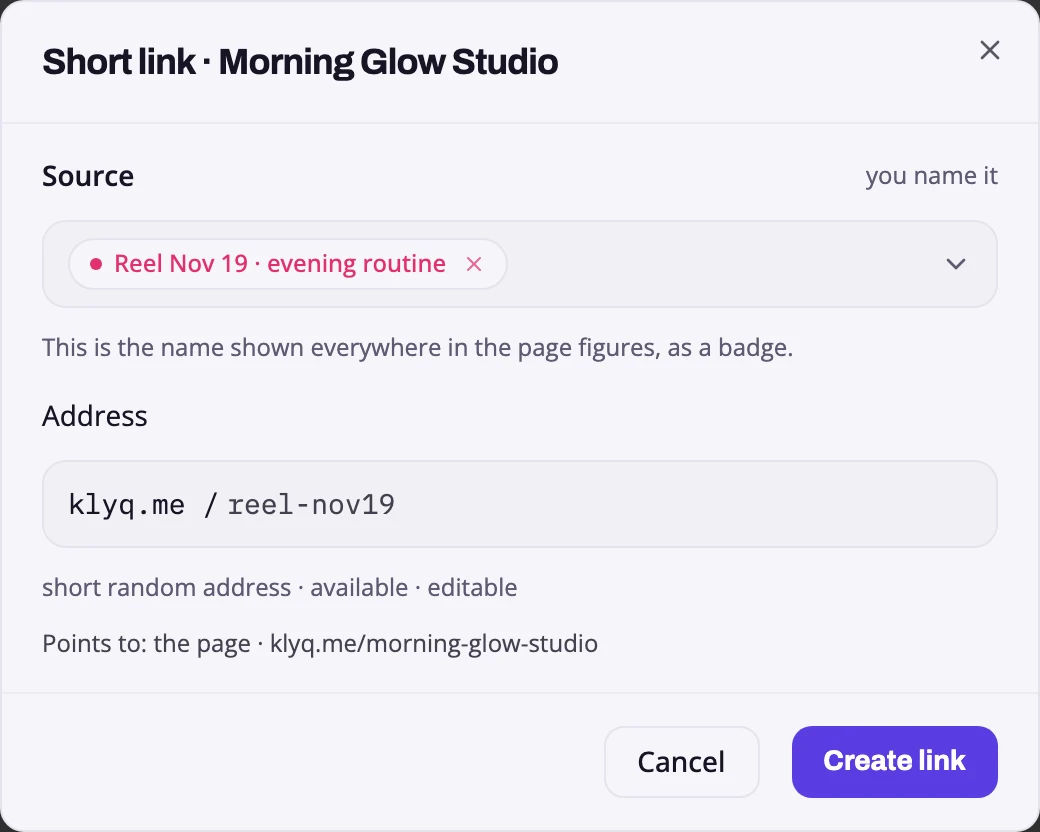
The source is the name you give the link. Here it is named after the reel.
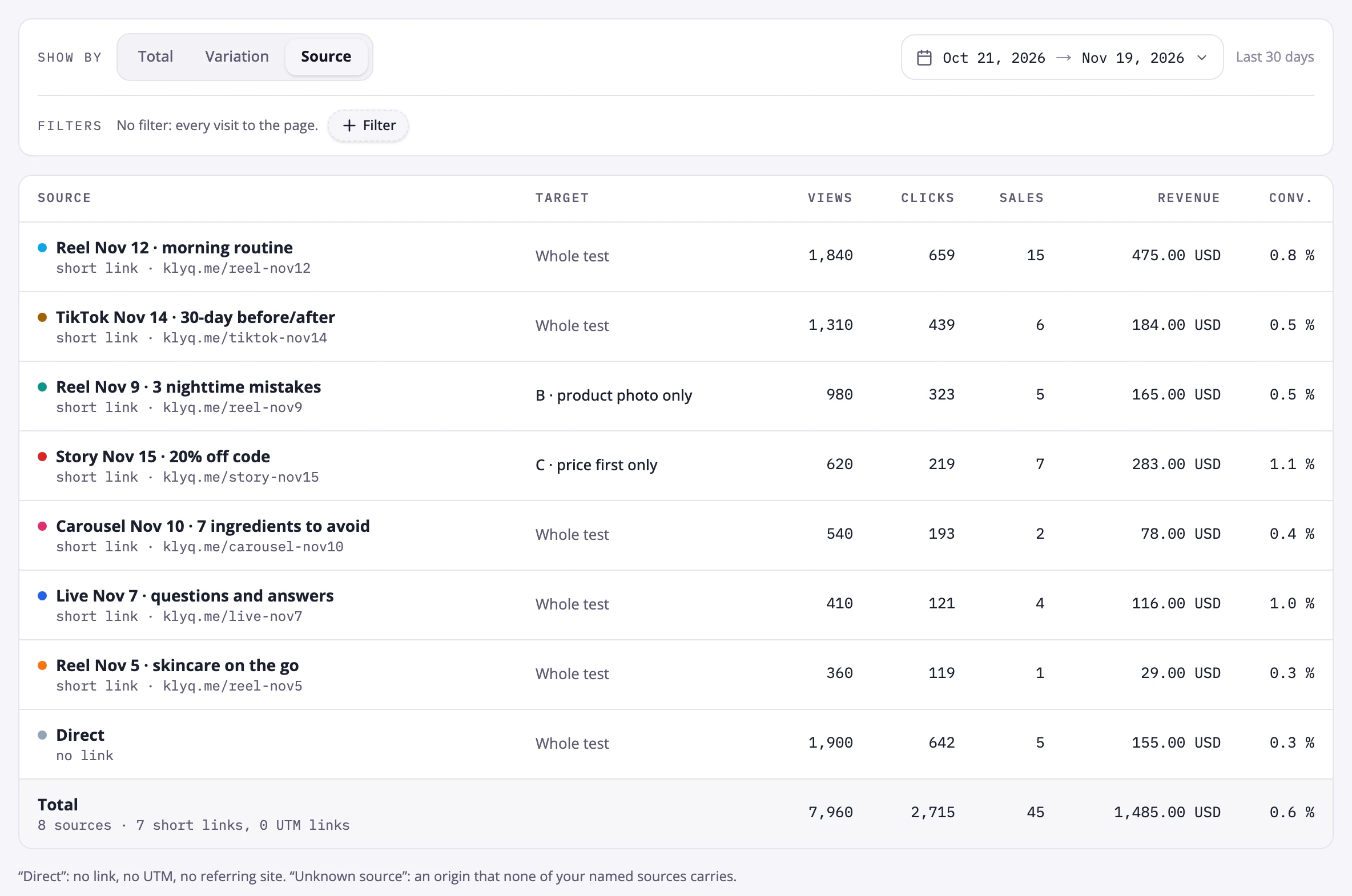
Example with demo data. Each row is one post, with its sales and revenue. "Direct" is what arrives without a link.
This works on the Free plan when you sell a digital product from a Klyqme page. Klyqme has three plans: Free, Core at $9.99 a month, and Growth at $29.99 a month. The seller fee on digital products is 5% on Free, 2% on Core, and 0% on Growth. If you sell on a Shopify store instead, sales tracking starts at Growth. See Klyqme pricing.
| Plan | $500 in sales | $1,000 in sales | $3,000 in sales |
|---|---|---|---|
| Klyqme Free (5%) | $25 | $50 | $150 |
| Klyqme Core (2%) | $19.99 | $29.99 | $69.99 |
| Klyqme Growth (0%) | $29.99 | $29.99 | $29.99 |
It is not the cheapest option on this page. Linktree Pro is.
Which one should you choose?
- You teach or coach. Courses, calls, a membership: choose Stan Store. It is built for this, and $29 with no seller fee is fair.
- You share a lot and sell a little. Choose Linktree. Start free, then look at the fee in your account. If it is the reported 12%, Pro pays for itself from about $125 in sales a month.
- You sell a digital product and want to know which posts earn. Choose Klyqme, or add it next to the tool you already use.
Neither one fits? We compared ten more in 10 Linktree alternatives for creators who sell.
Track sales from your next post. Start free.
Sources
Prices and features checked between November 18 and November 20, 2026.
- Stan Store, "Stan Store Pricing", updated July 22, 2026. https://stan.store/blog/stan-store-pricing/
- Linktree, pricing page, viewed November 18 and 20, 2026. https://linktr.ee/s/pricing
- Linktree Help Center, "About transaction and processing fees", updated October 12, 2026. https://linktr.ee/help/articles/11410206-understanding-transaction-and-processing-fees-on-linktree
- UseClick, "Linktree Pricing 2026: Plans, Seller Fees and Real Cost", October 29, 2026. https://useclick.io/blog/linktree-pricing
- We.Inc, "Linktree Pricing 2026", prices recorded September 28, 2026. https://we.inc/pricing-guides/linktree-pricing
- Linke.ro, "Linktree Plans Explained: Every Tier and Fee in 2026", updated July 31, 2026. https://linke.ro/blog/linktree-pricing-2026
- Stan Store, "Stan Store vs. Linktree", updated September 16, 2026. https://stan.store/blog/stan-store-vs-linktree/