Shopify Says "Direct" for Your Instagram and TikTok Sales. Here's How to See the Real Source
Shopify files many Instagram and TikTok sales under "Direct". See why it happens, how to check one order, and how to track each link you post for free.
You post on Instagram. Orders come in. You open Shopify to see what worked, and the report says Direct.
The short answer: Shopify can only name a source when the link the shopper tapped tells it one. A plain link in a bio or a story carries no label, so the sale can land in "Direct". Give every place you post its own labeled link and the real source shows up. Here is how, step by step.
What "Direct" means in Shopify
Shopify's own help center defines a direct referrer this way: the customer entered your store's URL into their browser. When Shopify cannot work out a referrer name at all, it shows N/A.
So "Direct" does not mean "nobody sent this person". It means "Shopify did not get a source for this visit".
One more thing to know. By default, Shopify gives the sale to the last non-direct click. If a shopper came once from a labeled link and later came back by typing your address, the labeled link still gets the credit. That only works if there was a labeled link in the first place.
Why social sales land in "Direct"
Four things send a sale from Instagram or TikTok into the "Direct" pile.
- The link had no label. A plain link to your store says nothing about where it was posted.
- The shopper switched devices. They saw your post on their phone and bought later on a laptop. A reply in the Shopify Community describes this case: the source is lost on the way.
- The shopper typed your address. They remembered your store name from a video and went straight to it.
- Cookies were blocked. Shopify's help center says the order's conversion summary can be empty when an app or a private browser blocks cookie tracking.
You cannot fix numbers 2, 3 and 4. You can fix number 1 today. It is the one you control.
Check one order in 30 seconds
Before you change anything, look at what Shopify knows about a real order.
- In your Shopify admin, go to Orders.
- Click an order number.
- Find the Conversion summary section.
- Click View conversion details if it is there.
You will see where the first visit came from, the page the shopper landed on, and any UTM parameters on the link. Shopify notes that these details can take up to 48 hours to appear.
If the summary is empty, or says the visit was direct, that order came through a link with no label.
The free fix: UTM links
A UTM link is your normal link with a few words added at the end. Those words tell Shopify where the link was posted.
A plain link:
https://yourstore.com/products/soy-candle
The same link with a label:
https://yourstore.com/products/soy-candle?utm_source=instagram&utm_medium=social&utm_campaign=story-nov-14
utm_sourceis the platform:instagram,tiktok.utm_mediumis the kind of traffic:social.utm_campaignis the name you choose:story-nov-14,bio,candle-reel.
Do not skip utm_campaign. Shopify's help center says traffic that arrives with a utm_campaign parameter is attributed to marketing.
Where to read the result in Shopify:
- Go to Analytics, then Reports.
- Click the Category filter and choose Marketing.
- Open Sales attributed to marketing.
The report lists sales by UTM campaign name. Each name you chose is now a line with its own sales.
This costs nothing. The work is in building a new link every time and keeping the names tidy. If you also want the page your bio link opens to sell, see how to sell products from your bio link.
Where a link can be tapped on Instagram and TikTok
A labeled link only helps if people can tap it. Many places on social apps show links as plain text.
| Place | Can people tap the link? |
|---|---|
| Instagram bio | Yes |
| Instagram story (link sticker) | Yes |
| Instagram direct message | Yes |
| Instagram caption | No |
| Instagram comment | No |
| TikTok bio | Yes, with at least 1,000 followers or a Business Account (any account can switch to Business for free) |
| TikTok caption | No |
That leaves you three useful places on Instagram: the bio, the story sticker and direct messages. On TikTok, it is the bio.
The limit of one bio link
Here is the part most guides leave out.
If all your posts say "link in bio" and the bio holds one link, nobody can tell which post sent the shopper. Not Shopify, not Instagram, not any tool. The app does not pass that along. You will know the sale came from your bio. You will not know if it was Monday's reel or Thursday's photo.
What you can measure is each different link. One link, one line in the report. So the rule is simple:
To know which post sells, each post needs its own link, placed where people can tap it.
In practice:
- Stories: a new link in the sticker for each story you want to measure.
- Direct messages: when someone asks "where can I buy this?", send a link made for that post.
- Bio: one link for the bio itself, so you know what the bio brings in total.
- Packaging and flyers: a QR code with its own link.
One link per place you post
You can do this two ways.
By hand, with UTM links
Build a UTM link for each story, each message and your bio, as shown above. Read the results in Sales attributed to marketing.
It works. It gets slow when you post every day, and the long links are easy to mistype.
With Klyqme
Klyqme is built for this job. You have one page for your store, and you make a separate share link for each place you post.
- Open Pages in the Klyqme dashboard and find your page.
- Click Share, choose Custom short link, and type the source: "Instagram bio", "Story Nov 14", "TikTok", "Shop QR".
- Put that link where it belongs.
Every share link opens the same page. Each one is counted on its own: clicks, sales and revenue per source, on the page's Figures tab with Show by: Source.
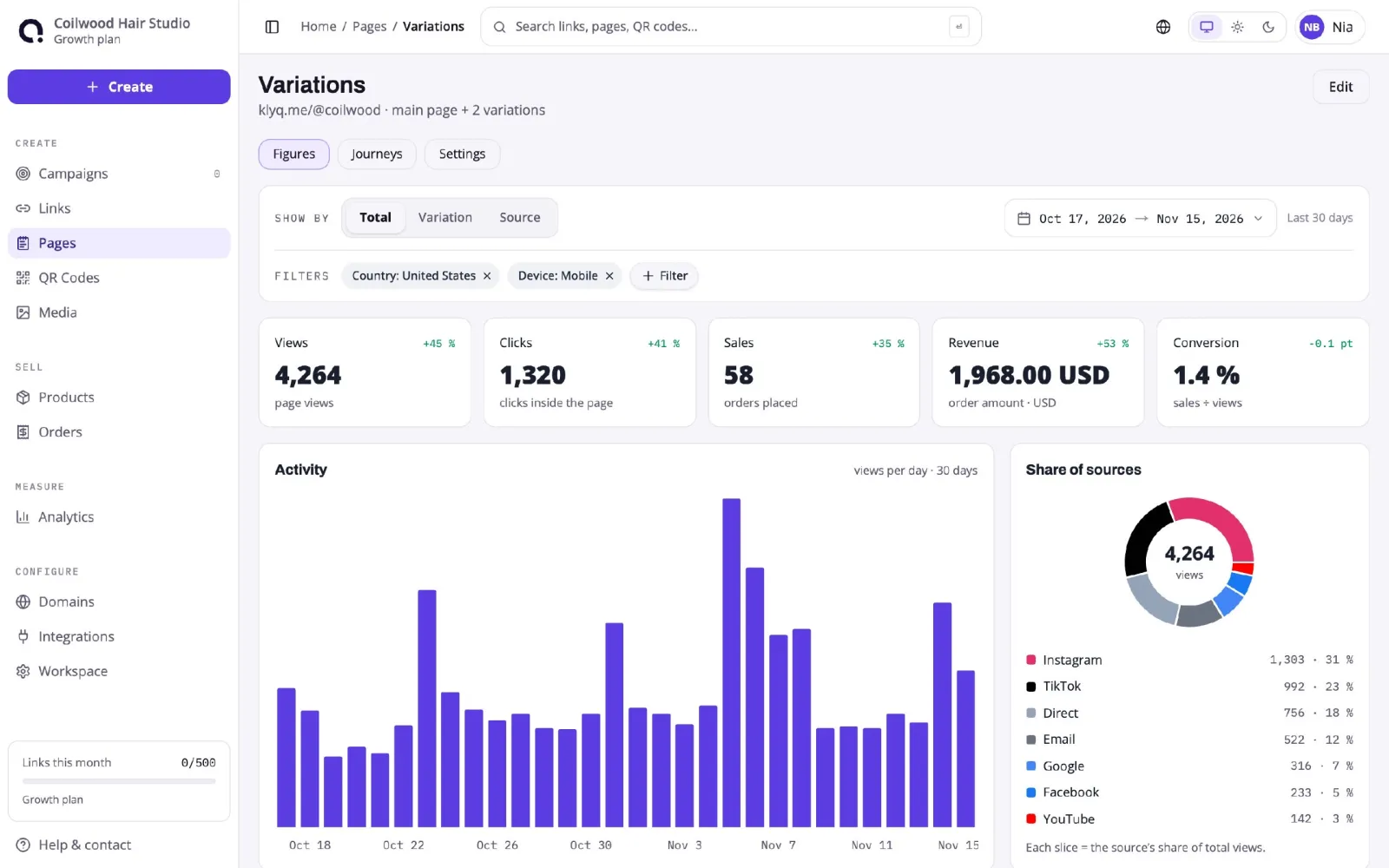
Four more things help:
- Short links per post. A link can go to a product, or straight to Shopify checkout with the product and its variant already in the cart. Each link has its own Sales and Revenue in your list of links.
- Revenue per product and per source. Klyqme shows the sales and revenue of each product and of each source, so you see which product sells and where its buyers came from.
- Your own UTMs, without typing them. Klyqme has a UTM builder. You set your own UTM parameters on a link in the dashboard, and Klyqme adds them when it sends the shopper to your store, so the same sale also shows up under the right campaign name in Shopify's Sales attributed to marketing report.
- The sale is not lost in "Direct". With your Shopify store connected, Klyqme attaches a marker to the cart, and the marker comes back with the order. A link straight to checkout does this on its own; for shoppers who browse your store first, the Klyqme tracking script must be in your theme. The sale then shows up next to the right link in Klyqme even when Shopify files it under "Direct".
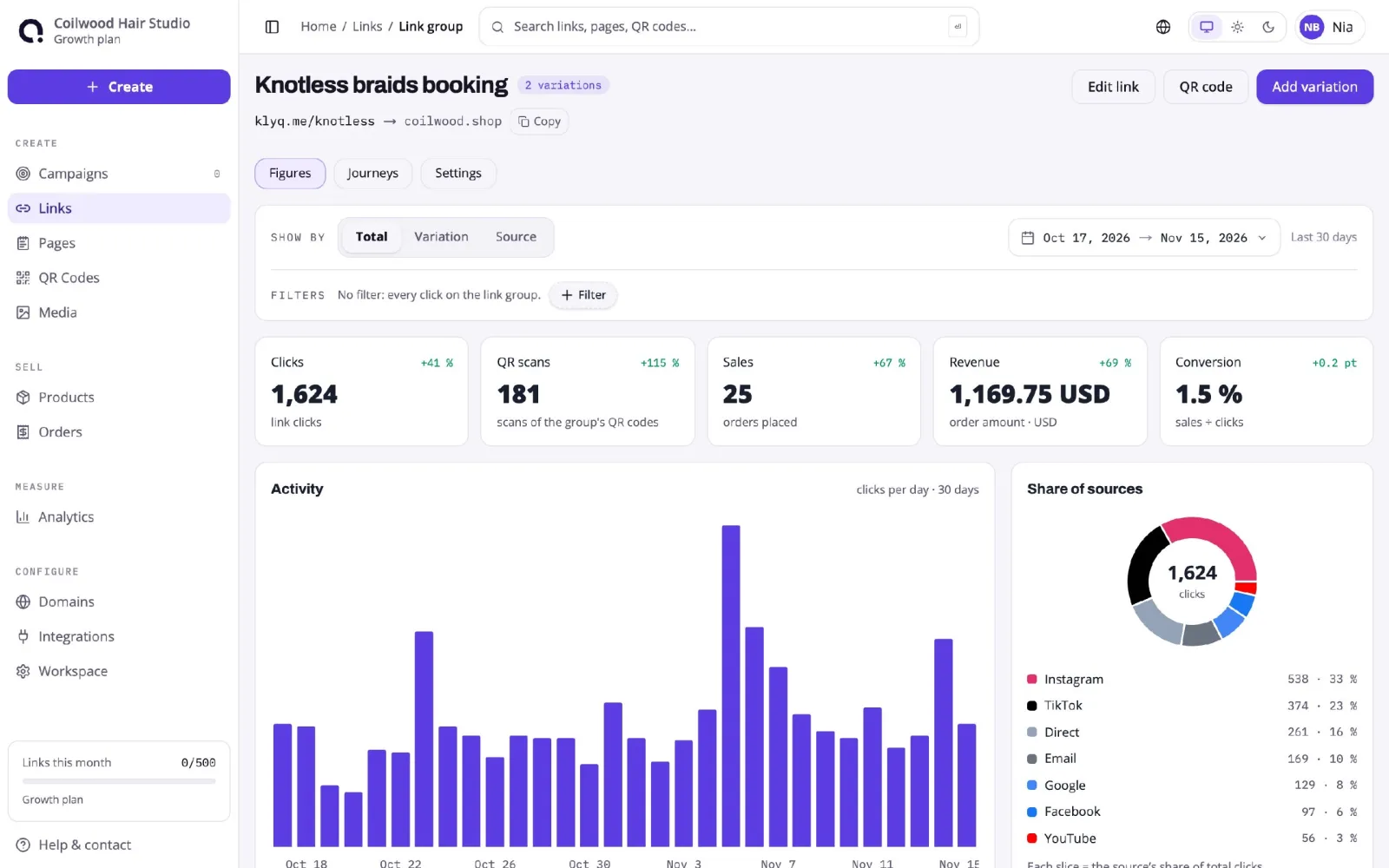
The same limit applies here. One link in the bio still cannot tell you which post sent the visitor. Klyqme measures each separate link, so the method stays the same: one link per place.
Klyqme has a free plan, and every link shows its sales and revenue on it. Share links with a named source, UTM links and sales by source are part of the Core plan, at $9.99 a month.
To see everything Klyqme measures, read about Klyqme analytics, or compare the best link in bio tools for Shopify. If you send links by automatic DM, see how we set up an Instagram auto DM and what its click count missed.
What to do this week
- Open three recent orders and read the Conversion summary of each.
- Replace the link in your bio with a labeled one.
- Use a new labeled link in your next three stories.
- In seven days, open Sales attributed to marketing and see which name sold.